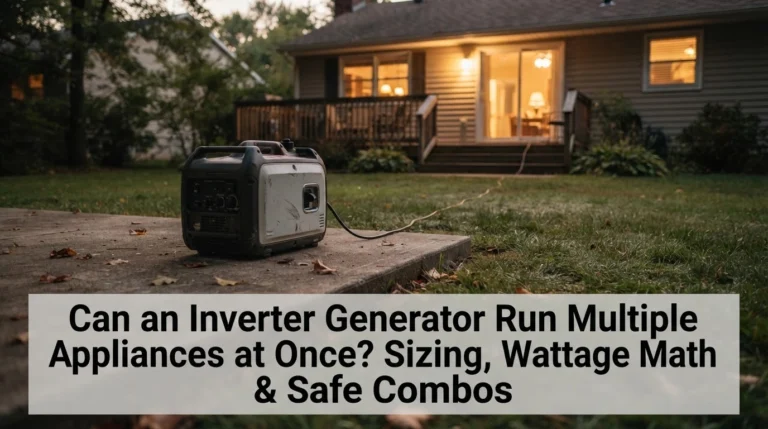
Can an Inverter Generator Power a Desktop Computer or Laptop? Clean Power, Wattage
Quick Answer
Yes, an inverter generator can power a desktop computer or laptop safely. Most desktops need 200 to 600 running watts, and most laptops need only 45 to 90 watts, so even a small 1,000-watt inverter generator has room to spare when you check what size inverter generator you need first.
Why it works so well
- Clean sine wave: Inverter generators produce stable, grid-like power that is safe for sensitive electronics.
- Low THD: Most quality models keep total harmonic distortion under 3%, which protects power supplies and chargers.
- Low wattage: A laptop uses less power than a light bulb in many cases, and a basic desktop uses less than a microwave.
- Stable voltage: The inverter holds voltage steady as load changes, so your screen does not flicker or reboot.
- Eco mode: Eco-throttle lowers engine speed at light loads, which saves fuel and cuts noise while you work.
Do this first
- Add up your computer, monitor, router, and any other gear, then leave 20% headroom.
- Plug the computer into a surge protector, never straight into a conventional open-frame generator.
- Run the generator outdoors, at least 20 feet from your home, with the exhaust pointed away.
I have run my laptop, monitor, and router through a three-day outage on a small inverter generator. The setup stayed quiet, the battery stayed charged, and I never lost a file.
This guide goes deeper than a yes-or-no answer. You will learn real wattage numbers, sizing math, safe connections, runtime, and the mistakes that actually damage computers.
In This Guide
- Why Inverter Generators Are Safe for Computers
- How Much Power Do Desktop Computers and Laptops Use?
- What Size Inverter Generator Do You Need for a Computer?
- How to Connect Your Computer to an Inverter Generator Safely
- Inverter Generator vs Conventional Generator for Electronics
- How Long Can You Run a Computer on an Inverter Generator?
- Common Mistakes That Can Damage Your Computer
- Frequently Asked Questions
- Final Takeaway
Why Inverter Generators Are Safe for Computers
An inverter generator is a portable generator that makes clean, stable AC power in three steps. It creates raw AC power, converts it to DC, then inverts it back to smooth AC power.
That extra step is the whole point for electronics. It removes the rough spikes and dips that can stress a computer power supply.
Computers are sensitive because their power supplies, motherboards, and chargers expect steady voltage. A sudden surge can corrupt a file, reboot a machine, or shorten the life of a component.
Inverter generators solve that problem in two ways. They hold frequency close to 60 Hz, and they hold voltage in a tight range.
What is clean sine wave power?
Clean sine wave means the power flows in a smooth, regular wave, just like power from your wall outlet. A rough wave has jagged steps that can make electronics run hot or act strangely.
Most inverter generators advertise total harmonic distortion, or THD, under 3%. THD measures how far the power wave strays from a perfect sine wave.
Lower is better here. A laptop charger, a desktop power supply, and a monitor all run best on low-THD power.
- Under 3% THD: Safe for laptops, desktops, monitors, routers, and phones.
- 3% to 5% THD: Often fine for basic electronics, but check your manual first.
- Over 5% THD: Risky for sensitive gear, and common on cheap conventional generators.
If you want a deeper check before you buy, look at our guide to the best portable generator with low THD. It explains which specs actually matter for electronics.
Does an inverter generator protect against surges?
An inverter generator is much safer than a conventional generator, but it is not a surge protector. You still need one between the generator and your computer.
I use a quality surge strip with a joule rating of at least 1,000. It costs little, and it catches the spikes that no generator can fully prevent.
Section Takeaway: Inverter generators are safe for computers because they produce clean sine wave power with low THD and stable voltage, but always add a surge protector for extra protection.
How Much Power Do Desktop Computers and Laptops Use?

Computers use far less power than most people expect. A laptop is one of the lightest loads in your home.
A desktop uses more, mainly because of its power supply, monitor, and graphics card. Even then, it rarely needs a large generator on its own.
Check the label on your power brick or power supply for the real number. The wattage printed there is the maximum, not what it uses all day.
How much power does a desktop computer use?
A basic office desktop uses about 200 to 300 running watts. Add a 24-inch monitor at 25 to 40 watts, and you are still under 350 watts.
A gaming desktop is a different story. A mid-range gaming PC can draw 400 to 600 watts under load, and a high-end rig with a large graphics card can reach 700 to 900 watts.
Gaming PCs also spike when a game loads or a fan kicks in. Leave headroom for those spikes, or the generator may trip.
How much power does a laptop use?
A typical laptop charger is rated at 45 to 90 watts. Most ultrabooks sit at 45 to 65 watts, while larger work laptops sit at 90 watts.
A gaming laptop can draw 150 to 230 watts while charging and playing. That is still light for an inverter generator.
A charged laptop also draws less once its battery is full. It sips power to stay topped up, which helps runtime a lot.
| Device | Typical Running Watts | Starting Watts |
|---|---|---|
| Laptop, ultrabook | 45-65 watts | 45-65 watts |
| Laptop, standard | 65-90 watts | 65-90 watts |
| Laptop, gaming | 150-230 watts | 150-230 watts |
| Desktop, office | 200-300 watts | 250-350 watts |
| Desktop, gaming | 400-600 watts | 500-750 watts |
| Monitor, 24-inch | 25-40 watts | 25-40 watts |
| Monitor, 27-inch | 35-60 watts | 35-60 watts |
| Wi-Fi router | 5-15 watts | 5-15 watts |
These are typical ranges, not exact figures for your model. Always check your own labels and spec sheet before you size a generator.
Section Takeaway: Most laptops need under 90 watts, most office desktops need under 350 watts with a monitor, and only gaming desktops push past 600 watts.
What Size Inverter Generator Do You Need for a Computer?
For a laptop alone, a 1,000-watt inverter generator is plenty. It leaves room for a monitor, a router, and phone charging at the same time.
For a basic desktop setup, a 2,000-watt inverter generator is the sweet spot. It handles the desktop, two monitors, a router, and lights without strain.
For a gaming desktop, start at 2,200 to 3,000 watts. That size covers spikes and leaves room for a monitor and a few small loads.
Use this simple math before you buy or borrow a generator. It takes two minutes, and it prevents overload shutdowns.
- List every device: Computer, monitor, router, printer, speakers, and phone charger.
- Add running watts: Add the running watts for everything you will run at once.
- Add starting watts: Computers have little surge, but add 20% headroom for spikes.
- Pick the next size up: If your total is 850 watts, choose a 1,000-watt or larger generator.
Here is a real example from my own outage setup. My laptop drew 65 watts, my monitor drew 30 watts, and my router drew 10 watts.
That total was 105 watts. Even a 1,000-watt generator ran it at barely 10% load, which meant long runtime and very low noise.
If you want the full method, read our guide on how to calculate the generator wattage you need. It walks through the same math for a fridge, a furnace, and other home loads.
Also learn the difference between running watts and starting watts before you size up. Running watts are what a device uses nonstop, while starting watts are the short surge when it turns on.
Section Takeaway: A 1,000-watt inverter generator covers most laptops, a 2,000-watt model covers most desktops, and a gaming desktop needs 2,200 watts or more.
How to Connect Your Computer to an Inverter Generator Safely
Start the generator first, then plug in your computer. Let the engine warm up for a minute and settle into a steady speed.
Use a heavy-duty outdoor extension cord rated for the load. A thin indoor cord can heat up and drop voltage over a long run.
Keep the cord run as short as practical. A 25-foot, 14-gauge cord works well for most computer setups.
- Place the generator outside: Put it at least 20 feet from your home, with exhaust pointed away from windows and doors.
- Start and stabilize: Start the generator, turn off eco mode for the first minute, then turn eco mode back on.
- Add a surge protector: Plug a surge strip into the extension cord, then plug your computer into the strip.
- Plug in one device at a time: Start with the computer, then add the monitor, router, and other gear.
- Save often: Save your work every few minutes during an outage, just in case fuel runs low.
A UPS, or uninterruptible power supply, adds another layer of protection. It gives you a few minutes to save and shut down if the generator stops.
I keep a small UPS between my surge strip and my desktop. It has saved me twice when a generator ran out of fuel mid-sentence.
Do not use a UPS as a charger for the generator, and do not plug a UPS into a UPS. Keep the chain simple: generator, surge protector, UPS, computer.
Safety note: Run generators outdoors and well away from windows, doors, and vents. Carbon monoxide is colorless and odorless, and it can build up fast indoors. Use a transfer switch or interlock installed by a licensed electrician for any home hookup, and check your owner’s manual before use.
For official safety guidance, see the CDC carbon monoxide guidance and the U.S. Consumer Product Safety Commission. Both stress outdoor placement and working CO alarms.
Section Takeaway: Start the generator first, use a surge protector and a short heavy-duty cord, and add a UPS if you want time to save and shut down safely.
Inverter Generator vs Conventional Generator for Electronics
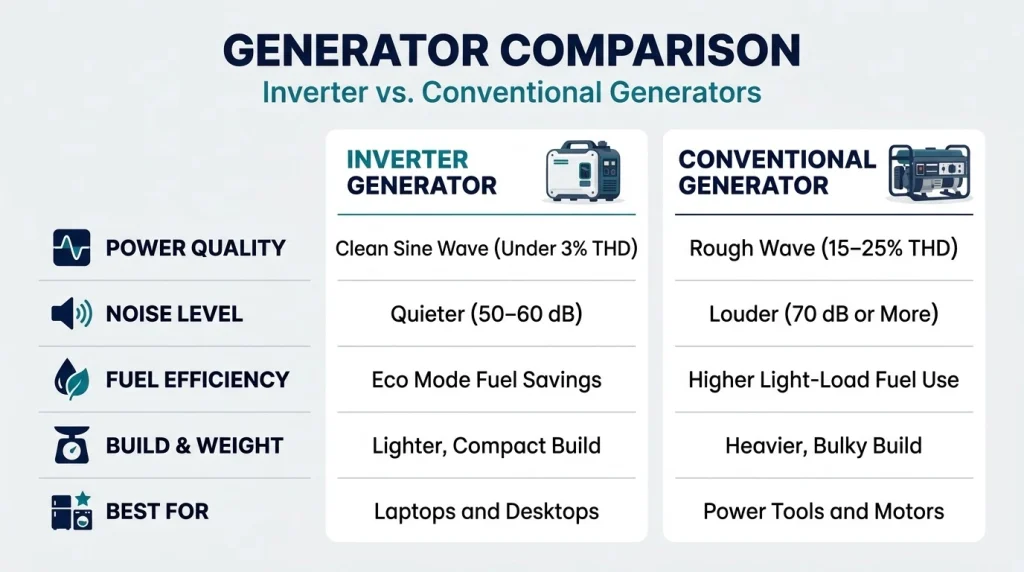
Can you run a computer on a conventional generator? You can, but I would not do it without extra protection.
Conventional open-frame generators often produce THD of 15% to 25%. That rough power can make a laptop charger buzz, a monitor flicker, or a desktop reboot under load.
Inverter generators cost more, but they are built for this job. They are quieter, lighter, more fuel-efficient at light loads, and far safer for electronics.
| Feature | Inverter Generator | Conventional Generator |
|---|---|---|
| Power quality | Clean sine wave, under 3% THD | Rough wave, often 15-25% THD |
| Safe for computers | Yes, with a surge protector | Risky, needs extra filtering |
| Noise | Quieter, often 50-60 dB | Louder, often 70 dB or more |
| Fuel use at light load | Low, thanks to eco mode | Higher, engine runs at full speed |
| Weight and size | Lighter and more compact | Heavier and bulkier |
| Best use | Laptops, desktops, RV, camping | Power tools, large motors, job sites |
If a conventional generator is all you have, use a UPS with line conditioning and a good surge protector. Do not plug a laptop directly into it for long work sessions.
Check your computer manual too. Some manufacturers warn against high-THD power, and that warning is worth following.
Section Takeaway: Choose an inverter generator for computers, and use a conventional generator only with a UPS and surge protection if you have no other option.
How Long Can You Run a Computer on an Inverter Generator?
Runtime depends on tank size, load, and eco mode. A computer load is light, so runtime is usually long.
A 2,000-watt inverter generator with a 1-gallon tank can run 8 to 10 hours at 25% load. A laptop setup uses far less than 25%, so it can run even longer in eco mode.
A 1,000-watt model with a smaller tank may run 6 to 8 hours on a laptop load. Check the spec sheet for runtime at 25% load, not at full load.
Eco mode makes a real difference here. It lets the engine slow down when the load is light, which saves fuel and cuts noise.
- Turn on eco mode: Use it for laptops and office desktops after the generator warms up.
- Turn it off for spikes: Turn eco mode off for a gaming desktop under heavy load.
- Keep fuel fresh: Use fresh gasoline and stabilizer if the generator sits for months.
- Refuel safely: Turn the generator off and let it cool before you refuel.
For a longer outage, a 2,000-watt model is a good fit for most home offices. See how much power a 2,000-watt inverter generator provides to plan what else you can run with your computer.
Safety note: Never refuel a hot generator, and store fuel outdoors in an approved container away from living spaces. Check your owner’s manual for oil-change intervals and break-in steps.
Section Takeaway: A light computer load can run 8 to 10 hours or more on a small inverter generator, and eco mode stretches that runtime further.
Common Mistakes That Can Damage Your Computer

Most computer damage on generator power comes from avoidable mistakes. The good news is that each one is easy to fix.
The first mistake is overloading a small generator. A desktop plus a fridge plus a space heater will trip the overload, and that sudden cut can corrupt files.
The second mistake is skipping the surge protector. Clean power helps, but it does not replace surge protection.
- Overloading the generator: Add loads slowly, and watch the overload light.
- Using a conventional generator: High THD can stress chargers and power supplies over time.
- Running indoors or in a garage: Carbon monoxide can build up fast, even with a door open.
- Using a long, thin cord: Voltage drop can cause reboots and unstable charging.
- Ignoring low oil: Low-oil shutdown protects the engine, but it also cuts power without warning.
- Forgetting to save: Save often, and use a UPS if you work on unsaved files.
Some loads should never share a small generator with a computer. Space heaters, hair dryers, and large power tools can spike the load and trip the breaker.
If you are unsure what is safe to plug in, read our guide on what not to plug into an inverter. It covers the loads that cause the most trouble.
For broader backup-power planning, the U.S. Department of Energy offers plain guidance on safe generator use and home backup power. Use it as a second check on your setup.
Section Takeaway: Avoid overloads, skip the surge protector at your own risk, never run a generator indoors, and save your work often during an outage.
Frequently Asked Questions
Can an inverter generator power a desktop computer and monitor?
Yes, a 2,000-watt inverter generator can power most office desktops and monitors with ease. Add the watts for both, leave 20% headroom, and use a surge protector.
Can an inverter generator charge a laptop?
Yes, a laptop is one of the easiest loads for an inverter generator. Most chargers need only 45 to 90 watts, so even a 1,000-watt model works well.
Is it safe to run a gaming PC on an inverter generator?
Yes, if the generator is large enough for the spikes. Use a 2,200-watt or larger inverter generator, turn eco mode off under load, and use a surge protector and UPS.
Do I need a UPS with an inverter generator?
You do not need one, but it helps a lot. A UPS gives you time to save and shut down if the generator runs out of fuel or trips.
Can I plug my computer directly into the generator?
You can, but use a surge protector in between. Plug the surge strip into the generator, then plug your computer into the strip for best protection.
Will an inverter generator damage my laptop battery?
No, a quality inverter generator with low THD should not damage a laptop battery. Use the original charger, avoid cheap adapters, and keep the generator within its rated load.
What size inverter generator do I need for a home office?
A 2,000-watt inverter generator covers most home offices. It can run a desktop, two monitors, a router, lights, and phone charging at the same time.
Final Takeaway
An inverter generator is one of the best ways to keep working through an outage. It is quiet, fuel-efficient, and safe for the electronics you rely on every day.
Start with your wattage math. Pick a generator with headroom, add a surge protector, and run it outdoors with fresh fuel.
Do that, and your laptop or desktop will keep running in 2026 just like it does on grid power. Save often, test your setup before the next storm, and you will be ready.

Hi, I’m Michael Turner. I own a generator workshop in the United States and founded HomeGeneratorBlog to share practical, hands-on guidance about generator installation, maintenance, troubleshooting, safety, and backup power solutions. My goal is to help homeowners make smarter, more confident decisions through clear and reliable information