Jackery Explorer 290 Review: Is It Worth It?
The Jackery Explorer 290 portable power solar generator is a compact, rechargeable power station featuring a 290Wh lithium-ion battery. It is designed to power small electronics during camping trips, road travel, and short power outages.
This Jackery Explorer 290 review examines its performance, charging options, practical limitations, and overall purchasing value. Its straightforward design targets buyers who prioritize portability over heavy-duty power capacity.
Unlike conventional fuel-powered generators, this unit stores electricity for later use. Pairing it with a compatible solar panel creates a portable solar charging system suitable for outdoor adventures.
🏆 My Quick Verdict
💡 Best For: Weekend campers, road travelers, and households requiring temporary backup power for small electronic devices.
⚡ Key Specs:
290Wh lithium-ion battery, 200W continuous output, 400W surge capacity, and 7.5-pound weight.
✅ Bottom Line: The Explorer 290 provides practical entry-level portable electricity. However, its older battery technology and modest inverter capacity make newer alternatives worth comparing.
Rating reflects an editorial assessment of documented specifications, portability, charging flexibility, and limitations rather than hands-on testing.
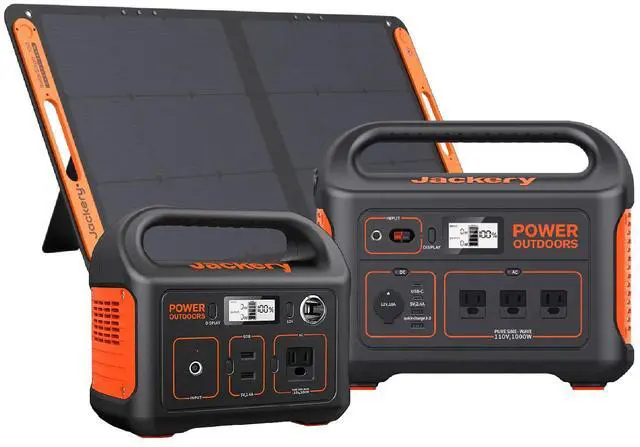
Jackery Explorer 290 At a Glance
- Compact battery capacity makes it suitable for short outdoor excursions.
- A built-in inverter supplies AC electricity without requiring gasoline.
- Multiple charging methods provide flexibility when traveling away from home.
- Dedicated USB and automotive outputs accommodate common portable electronics.
- An integrated display helps users monitor electricity consumption and remaining charge.
- Optional solar charging supports longer adventures when sunlight is available.
Jackery Explorer 290 Specifications
The Explorer 290 combines a relatively small battery with an inverter intended for low-demand electrical equipment. The following specifications are documented in the original product manual.
| Specification | Details |
|---|---|
| Brand | Jackery |
| Model | Explorer 290 |
| Battery Capacity | 290Wh (20.3Ah / 14.4V) |
| Battery Type | Lithium-ion |
| Continuous AC Output | 200W |
| Peak Surge Output | 400W |
| AC Output Voltage | 110V, 60Hz |
| USB Outputs | 2 × USB-A, 5V/2.4A |
| Automotive Output | 12V/10A |
| DC Input | 19V/3.42A, supports 12–30V |
| Dimensions | 9.1 × 5.2 × 7.7 inches |
| Weight | 7.5 lbs (3.4 kg) |
| Wall Charging Time | Approximately 5.5 hours |
| Car Charging Time | Approximately 6.5 hours |
| Operating Temperature | 14°F to 104°F during device operation |
| Original Limited Warranty | 24 months, subject to purchase terms |
Technical reference: Jackery Explorer 290 user manual and specifications. Warranty coverage may differ for refurbished units and individual sellers.
Design & Build Quality
The Jackery Explorer 290 uses a compact enclosure with an integrated carrying handle. Its narrow footprint makes transportation and storage particularly convenient.
The front-facing connection layout provides easy access to charging ports. Users can connect equipment without repeatedly repositioning the power station.
Its physical design prioritizes practical handling rather than extensive customization. The small enclosure fits comfortably alongside typical camping equipment.
Side ventilation openings help manage internal operating temperatures. These openings must remain unobstructed whenever the unit supplies electricity.
Although marketed for outdoor applications, buyers should not assume waterproof construction. Keep the enclosure protected from rainfall, condensation, and excessive dust.
Setup, Installation & Ease of Use
- Unpack the power station and inspect the enclosure for transportation damage.
- Confirm that the wall adapter, automotive charging cable, and documentation are included.
- Fully recharge the internal battery before its first operation.
- Position the unit on a stable, dry surface with adequate ventilation.
- Check the electrical requirements of every device before connecting it.
- Activate the appropriate output using its dedicated power control.
- Monitor battery percentage and electricity consumption through the display.
- Secure the unit against movement when transporting it inside a vehicle.
- Disconnect accessories and switch off outputs before placing it into storage.
Core Performance & Feature Breakdown
The Explorer 290 performs best when supplying modest electrical loads rather than demanding household appliances. Understanding power consumption is essential for selecting compatible equipment.
Battery Capacity and Estimated Runtime
Its battery stores a nominal 290 watt-hours of energy. Actual usable electricity depends on conversion losses, operating conditions, and battery health.
For planning purposes, assuming 85% usable energy provides approximately 246.5Wh. This is an illustrative calculation, not a measured performance result.
| Example Device | Assumed Load | Estimated Runtime |
|---|---|---|
| LED Light | 5W | 49.3 hours |
| Wi-Fi Router | 10W | 24.7 hours |
| Small Fan | 20W | 12.3 hours |
| Laptop | 45W | 5.5 hours |
| Small Television | 60W | 4.1 hours |
| Compatible Electronic Equipment | 100W | 2.5 hours |
These estimates assume constant consumption and a healthy, fully charged battery. Inverter standby consumption can substantially shorten runtime, especially with very small AC loads.
AC Power Delivery
The integrated inverter accommodates electronics that operate within its rated continuous output. It is particularly useful for equipment requiring standard household electrical connections.
Motor-driven equipment requires additional consideration because startup demand can exceed normal operating consumption. A device’s running wattage alone does not guarantee compatibility.
Solar Charging Performance
The Explorer 290 accepts electricity from compatible external solar panels. This capability reduces dependence on conventional electrical outlets during extended trips.
The original manual estimates around five hours of charging with a compatible 100W panel under favorable weather conditions. Real charging speeds depend on sunlight, panel positioning, and temperature.
Expert Insight
Solar panel wattage represents rated generation capacity rather than guaranteed charging input. Verify connector compatibility, input voltage, and electrical limits before purchasing a third-party panel.
Key Features Explained
The Explorer 290 emphasizes accessible controls and conventional charging connections. Its features are particularly relevant to users purchasing their first portable power station.
1. Integrated LCD Display
The LCD provides battery percentage alongside incoming and outgoing wattage readings. This information helps users adjust consumption before exhausting the available energy.
2. Dedicated USB Charging Ports
Two USB-A connections accommodate compatible phones, rechargeable lights, and other accessories. However, the absence of native USB-C Power Delivery limits direct charging flexibility for modern laptops.
3. Automotive Power Connection
The 12V automotive socket accommodates compatible travel equipment using vehicle-style power connectors. Connecting suitable DC equipment directly can avoid unnecessary AC conversion.
4. Multiple Recharging Options
Wall, vehicle, and compatible solar charging provide three different energy replenishment methods. This flexibility allows owners to adapt their charging routine to available resources.
Real-World Usability & Maintenance
The Explorer 290 requires less routine mechanical maintenance than a conventional gasoline generator. There are no engine oil changes, spark plugs, or fuel-system cleaning requirements.
Owners should inspect charging cables regularly and remove accumulated dust using a dry cloth. Never introduce liquids into the electrical connections or ventilation openings.
Recharge the battery periodically during extended storage according to the supplied manual. Avoid leaving the unit inside excessively hot vehicles or storing it completely depleted.
Jackery Explorer 290 Pros and Cons
Pros
- Lightweight construction makes frequent transportation manageable.
- Independent charging connections accommodate several common electronics.
- Battery-powered operation produces no combustion exhaust at the point of use.
- Simple physical controls reduce the learning curve for beginners.
Cons
- Limited inverter output excludes most high-consumption kitchen appliances.
- Conventional lithium-ion technology is less attractive for intensive cycling than newer LiFePO4 alternatives.
- Relatively slow wall charging reduces convenience during repeated daily use.
Common Issues & Fixes
Most routine operating problems involve excessive demand, unsuitable charging conditions, or insufficient battery capacity.
Power Station Suddenly Shuts Off
Connected equipment may exceed the permitted output or trigger overload protection. Disconnect the equipment and restart the appropriate output with a compatible load.
Solar Charging Is Too Slow
Shade, poor panel orientation, or unsuitable electrical connections can reduce incoming power. Reposition the panel toward direct sunlight and verify charging compatibility.
Battery Drains Faster Than Expected
Conversion losses, battery aging, and unrecognized background consumption can reduce available runtime. Inspect connected loads and disable unused output circuits.
What to Know Before You Buy
The Explorer 290 is an older portable power station, making purchase conditions especially important. Buyers should verify whether a listing represents new, refurbished, or previously used equipment.
Check whether the advertised package includes solar panels or only the battery station. Solar generator terminology does not automatically indicate that photovoltaic equipment is supplied.
- Confirm that your intended devices operate within the inverter’s electrical limits.
- Verify the condition and availability of compatible replacement charging accessories.
- Check the seller’s return policy and applicable warranty coverage.
- Compare battery condition and charging speed against newer competing models.
Do not purchase this model as a dedicated emergency supply for life-supporting medical equipment. The original manufacturer documentation excludes applications where personal safety depends on uninterrupted electricity.
Who Should Buy It / Who Should Skip It
✅ Who Should Buy It
- Weekend campers charging essential personal electronics.
- Road travelers requiring supplementary portable electricity.
- Photographers maintaining compatible camera battery chargers.
- Budget-conscious buyers finding a discounted unit with dependable battery condition.
- Households preparing for brief interruptions affecting communication devices.
✗ Who Should Skip It
- Homeowners seeking whole-house emergency backup electricity.
- Users powering electric heaters or cooking appliances.
- Frequent travelers requiring high-wattage USB-C charging.
- Off-grid residents expecting substantial daily energy storage.
- Buyers prioritizing modern long-cycle battery chemistry.
Alternatives to Consider
The Jackery Explorer 300 Plus and EcoFlow RIVER 2 are compelling alternatives for buyers who want more contemporary portable power technology.
Jackery Explorer 300 Plus
Best For: Frequent campers seeking modern battery technology.
Main Advantage: LiFePO4 battery chemistry and greater inverter output provide improved flexibility for regular use.
Trade-off: Nominal energy storage remains similar to the Explorer 290.
Key Spec: 288Wh battery capacity and 300W continuous AC output.
EcoFlow RIVER 2
Best For: Travelers prioritizing convenient battery replenishment.
Main Advantage: Faster AC charging and LiFePO4 construction suit more frequent charging routines.
Trade-off: Lower nominal battery capacity provides less stored energy than the Explorer 290.
Key Spec: 256Wh battery capacity and 300W rated AC output.
Is the Jackery Explorer 290 Worth It?
The Jackery Explorer 290 remains worth considering when available at a meaningful discount. Its purchasing value depends heavily on battery condition and the price difference compared with newer models.
Occasional users may benefit more from affordable ownership than advanced charging capabilities. Frequent users should consider the long-term advantages of newer battery chemistry.
A well-maintained unit can still fulfill basic recreational electricity requirements. However, paying a premium for older technology is difficult to justify.
Final Verdict
The Jackery Explorer 290 portable power solar generator is a sensible entry-level choice for occasional camping and modest emergency electricity needs. Purchase it when the condition, warranty, and selling price make it competitive.
For intensive daily operation, prioritize a newer LiFePO4 power station instead. That investment may provide greater long-term ownership value.
Frequently Asked Questions
Can the Jackery Explorer 290 run a refrigerator?
The Explorer 290 can power certain low-wattage portable refrigerators with compatible startup requirements. Most full-size household refrigerators are unsuitable because their starting demand may exceed the inverter’s limits.
Does the Jackery Explorer 290 come with a solar panel?
The standard Explorer 290 package does not include a solar panel. Compatible panels are optional accessories unless the seller specifically offers a solar generator bundle.
Can the Jackery Explorer 290 charge while powering devices?
Yes, the original Explorer 290 documentation supports simultaneous recharging and device operation. This capability should not be confused with a dedicated uninterruptible power supply.
Can a Jackery Explorer 290 power a coffee maker?
Most conventional electric coffee makers exceed the Explorer 290’s 200W continuous output. Check the appliance’s electrical rating before attempting to connect it.
What is the warranty on the Jackery Explorer 290?
The original product manual specifies a 24-month limited warranty. Actual coverage depends on purchase eligibility, seller conditions, and applicable warranty exclusions.
How should I maintain my Jackery Explorer 290 battery?
Store the battery in a dry, temperature-controlled environment and recharge it periodically. Follow the original manual’s charging instructions and avoid prolonged storage with a depleted battery.
Affiliate disclosure: HomeGeneratorBlog earns a small commission when you purchase through links on this page — at no extra cost to you. Our editorial process is independent: affiliate relationships never influence which products we recommend or how we rank them.

Hi, I’m Michael Turner. I own a generator workshop in the United States and founded HomeGeneratorBlog to share practical, hands-on guidance about generator installation, maintenance, troubleshooting, safety, and backup power solutions. My goal is to help homeowners make smarter, more confident decisions through clear and reliable information